Why AI Gets Type Scale Math Wrong
AI often gets type scale math wrong because a modular scale is exponential arithmetic — base × ratio^n — and a language model answering directly from language approximates that arithmetic rather than performing it. The results look right: plausible pixel values, close to the true ones. But they drift, most visibly at half-steps and whenever each new size is multiplied from an already-rounded previous one.
The distinction worth drawing immediately: this is not about typographic judgment. Ask a model which ratio suits a text-dense dashboard and the advice is usually sound. The failure lives one layer down, in the arithmetic — and mapping exactly where that layer starts is the point of this article, part of our guide to AI and design systems. Not to mock the model, but to mark the boundary: language is its home turf; exponential precision is the calculator’s.
What math does a type scale actually require?
A modular type scale derives every font size from one base and one ratio:
size(i) = base × ratio^iThe operation that matters is the exponent. Each step multiplies the full result of the previous calculation, so precision has to be carried in unrounded decimals all the way up — an error of a third of a pixel at step two becomes a full pixel at step three and two pixels at step four. Exponentiation doesn’t forgive small mistakes; it compounds them.
Why do language models approximate instead of calculate?
A language model produces text one token at a time, guided by what is statistically likely given everything before it. Numbers are tokens too. The model has read enough arithmetic to have absorbed strong patterns for what an answer looks like — right magnitude, right neighborhood, right number of digits — so its output lands near the true value with the confidence of a computed one. What it does not have, when answering straight from language, is an arithmetic unit carrying exact decimals through an exponent.
For most everyday numbers the approximation is close enough to pass. An exponential scale is precisely the kind of task where “close” surfaces: compounding punishes each small error, and the rounding step at the end turns a 0.4px drift into a visibly different integer.
One honest caveat: many assistants can call a code tool, and when the model actually executes the calculation, the numbers come back right. The failure class belongs to answers produced directly from language — and nothing in the phrasing of an answer tells you which kind you got.
What does the drift look like in real numbers?
Take the most common configuration in the wild: base 16, ratio 1.333 (a perfect fourth). The correct procedure computes each exact value, then rounds it:
| Step | Exact value | Correctly rounded |
|---|---|---|
| 0 | 16 | 16 |
| 1 | 21.328 | 21 |
| 2 | 28.430 | 28 |
| 3 | 37.898 | 38 |
| 4 | 50.518 | 51 |
| 5 | 67.340 | 67 |
Now the compounding failure mode — multiplying forward on already-rounded values, which is what an approximating model (and, to be fair, many careful humans with a calculator) tends to do:
16 × 1.333 = 21.328 → 21
21 × 1.333 = 27.99  → 28
28 × 1.333 = 37.32  → 37   (true scale: 38)
37 × 1.333 = 49.32  → 49   (true scale: 51)
By step 3 the sequence says 37 where the scale says 38; by step 4 it says 49 where the scale says 51. Every value is a believable heading size — nothing about “49px” looks wrong — but the system it belongs to no longer follows its own stated ratio.
Half-steps expose the approximation even faster. The exact value of 16 × 1.333^1.5 is 24.62, which rounds to 25. A model that approximates 1.333^1.5 as roughly 1.5 answers 24 — one pixel off, on exactly the kind of size (a lead paragraph between body and heading) that teams reach for a half-step to get.
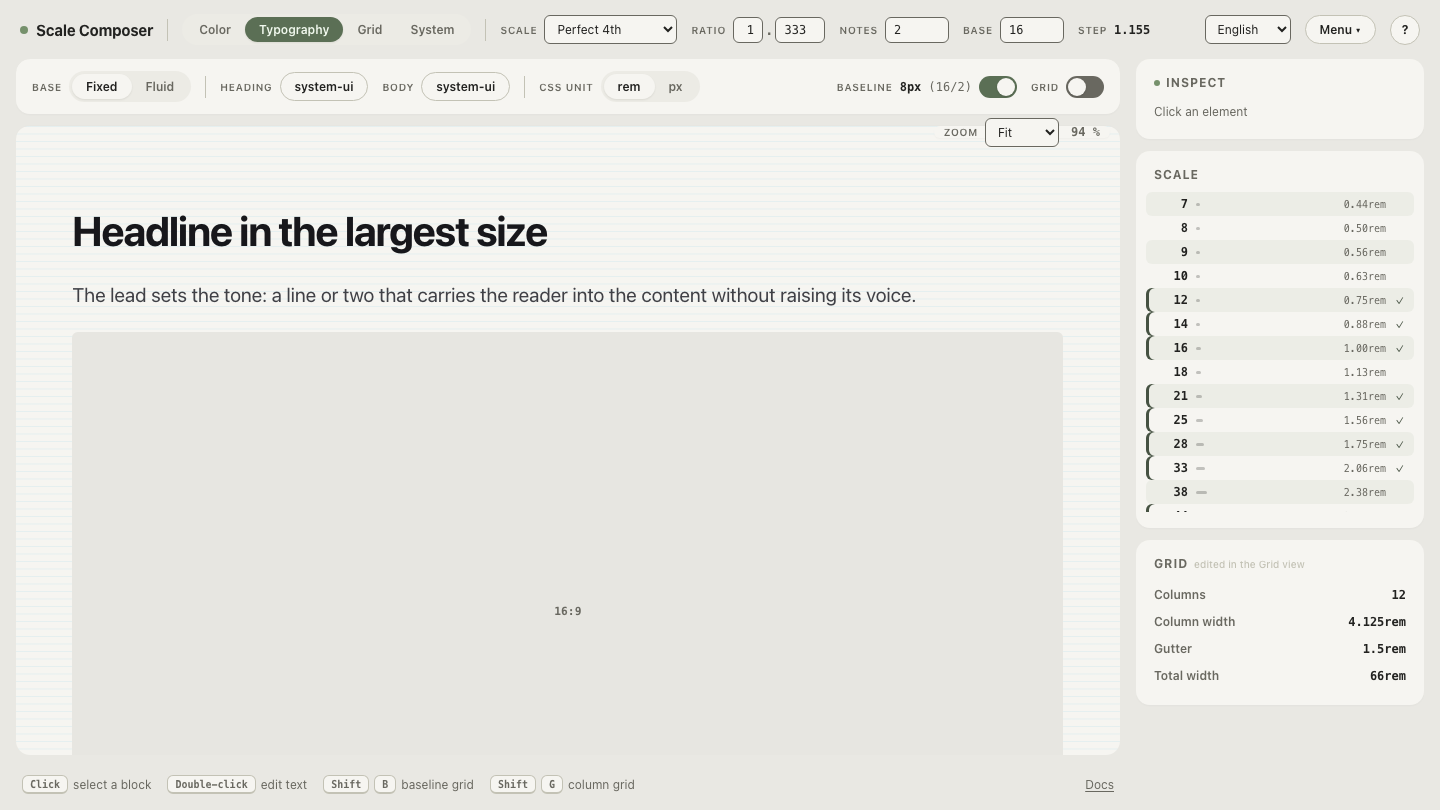
Open the computed perfect-fourth scale in Scale Composer — the same base and ratio as the table, every step calculated from the exact exponential value and rounded once, at the end.
Why is the rounding discipline so easy to miss?
Because the wrong procedure feels rigorous. Multiplying each rounded size
by the ratio is applying the formula — just to the wrong input. The
correct discipline is to compute base × ratio^n in full precision and
round that exact value (in code,
Math.round
applied to the unrounded result), never propagating a rounded number
forward into the next multiplication. Scale Composer computes every step
this way, which is why its scales stay regenerable: the same inputs
produce the same outputs, forever.
That regenerability is the practical stake. A scale that shipped as 16/21/28/37/49 can’t be reproduced by any correct calculation — the next time someone recomputes it honestly, they get 38 and 51, and the diff looks like a design decision when it’s actually an arithmetic correction.
Where does AI genuinely help with typography?
Everywhere the task is judgment expressed in language. Recommending a ratio for a content type — where its advice tends to align with our guide to choosing a type scale ratio — explaining the tradeoff between subtle and dramatic hierarchies, naming the levels, pairing weights, drafting the documentation. Those are sampling tasks over a large corpus of typographic writing, and the model performs them well. The division of labor is narrow and clean: let the model talk you to a base and a ratio, then let something deterministic raise the power.
Feel the discipline at a gentler ratio
The subtlety is easier to feel than to memorize: open the same 16px base at a minor third — ratio 1.2 — and watch the rounded steps. The gentler the ratio, the closer neighboring sizes sit, and the more a single misrounded pixel matters to the hierarchy. Compare the steps against what you’d get multiplying rounded values forward — on a tight scale, the discipline isn’t pedantry; it’s the difference between adjacent levels reading as intentional or accidental.