Browser Support for oklch() in 2026
oklch() works in every major browser engine, and has since 2023: Chrome and
Edge shipped it in version 111 (March 2023), Firefox in 113 (May 2023), and
Safari earlier still, in 15.4 (March 2022). For evergreen browsers in 2026,
support is effectively universal. The real question has shifted from can I
use it to what about the long tail — the shrinking population of embedded
WebViews and pinned corporate browsers that never update.
This is the status page of our OKLCH guide: the version facts, who is still left out, and the fallback strategies ranked from cheapest up. Support facts age by design, which is why this page carries its updated date as part of the answer.
Which browser versions added oklch()?
| Browser | First version with oklch() | Shipped |
|---|---|---|
| Safari | 15.4 | March 2022 |
| Chrome | 111 | March 2023 |
| Edge | 111 | March 2023 |
| Firefox | 113 | May 2023 |
Safari led by a year — WebKit shipped the CSS Color Level 4 functions early — and the Chromium and Firefox releases landed within weeks of each other in spring 2023, when the color functions were an Interop focus area. For the current numbers at any moment, the live support table on Can I Use tracks versions and global usage share; by now, several release-years of auto-updating browsers separate today’s users from the last engines without it.
Who still can’t render oklch()?
Not desktop or mobile browsers that update themselves — that population moved on years ago. The remaining gaps cluster in places where an engine gets frozen:
- Old embedded WebViews — apps and devices that bundle a browser engine and stopped updating it: aging smart-TV browsers, kiosk shells, in-app browsers on devices that no longer receive OS updates.
- Corporate fleets pinned on old browsers — locked-down environments where IT froze the browser version years back and validates upgrades slowly.
Whether this matters is an audience question, not a technology question. A consumer site will see these environments as a rounding error; an intranet for a fleet frozen in 2021 will see them as the whole audience. If you want the call to be data rather than doctrine, your own analytics settle it: the share of sessions on pre-2023 engines is a number you can read off a browser report, and for most public sites it has sunk below the noise floor. For most projects in 2026, then, the fallback is cheap insurance rather than a requirement — worth adding because it costs almost nothing, not because the risk is large.
What do you gain by writing oklch() at all?
The short version of the case:
OKLCH’s lightness value tracks how bright a color actually looks,
so palettes can be generated — steps placed on a
lightness curve look evenly spaced, and contrast between roles becomes a
property of the scale rather than a per-pair test. Hex can ship those results,
but it can’t express the reasoning;
oklch() keeps the logic readable in the stylesheet.
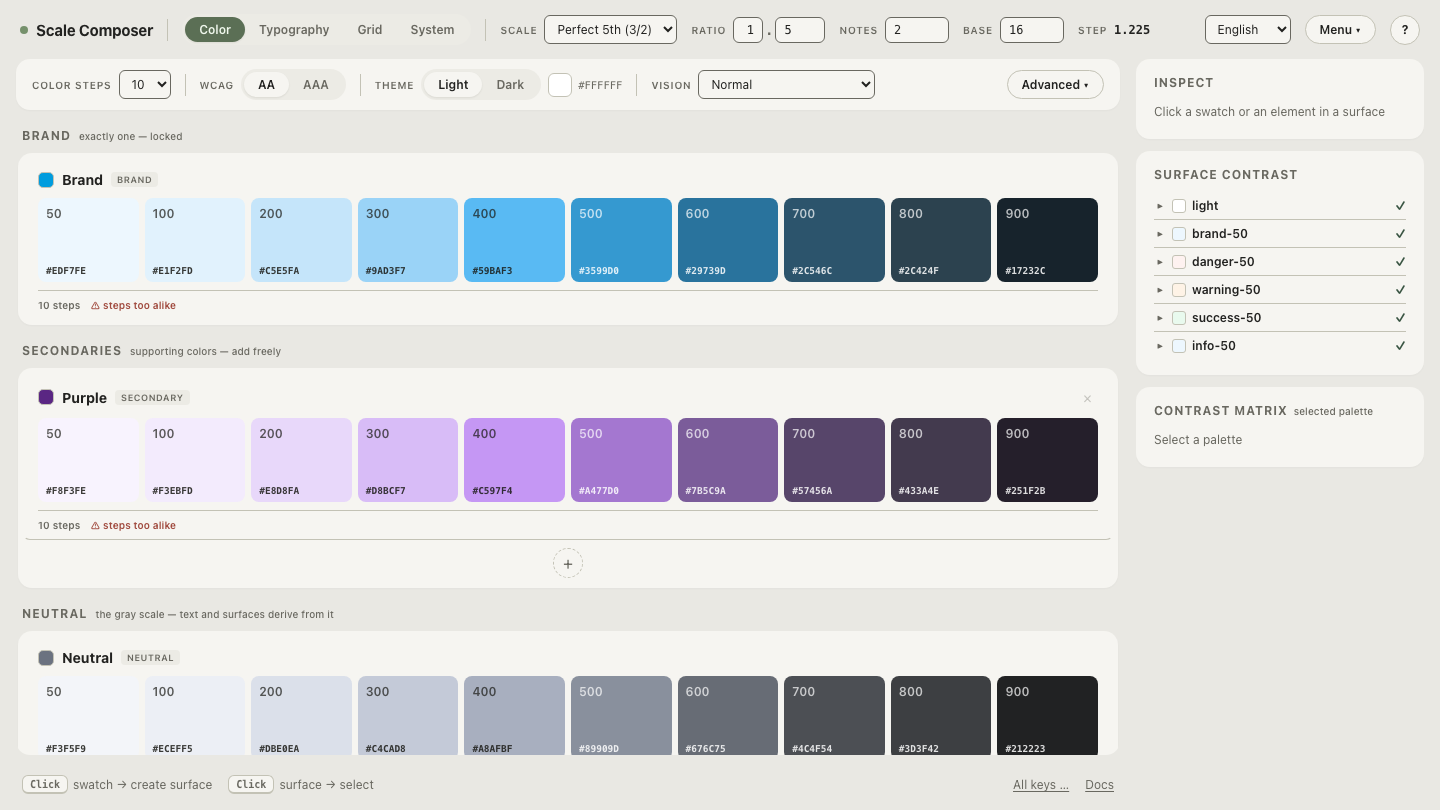
The gain is easiest to see in a generated palette:
open a scale built natively in OKLCH in Scale Composer — steps
on a lightness curve, each carrying the oklch() value a modern browser reads
directly.
What is the best fallback strategy?
Ranked from cheapest to most structural:
1. Ordered declarations. The cascade does all the work:
.button {
  background: #2563eb;                  /* read by every browser  */
  background: oklch(0.546 0.215 262.9); /* wins where supported   */
}
A browser that doesn’t recognize oklch() drops the second declaration as
invalid and keeps the hex; one that does lets the later declaration win. No
tooling, no runtime cost, works per property. (The two values above are the
same blue — the hex is simply its sRGB spelling.)
2. @supports blocks. When a whole section of the design depends on
wide-gamut color — a P3 accent layer, say — a
feature query keeps the logic in one place instead of pairing every
declaration:
@supports (color: oklch(0.5 0.1 200)) {
  /* wide-gamut accents live here */
}
Worth it for larger sections; overkill for individual colors.
3. Solve it in the token pipeline. Hand-writing pairs doesn’t scale past a handful of colors. The structural answer is to generate both spellings from the same palette source: Scale Composer’s exports — DTCG, CSS, Tailwind v4, Figma Variables — always carry hex alongside the OKLCH values, so a legacy consumer reads the same palette through its sRGB spelling while modern engines get the full-precision color.
How do you ship it today?
Treat OKLCH as the source of truth and let the export layer produce the safety
net: modern browsers read oklch(), everything else reads the hex twin, and
nobody maintains two palettes.
Open the same scale’s hex fallback view — every step paired
with its sRGB hex, exactly the pair the ordered-declaration pattern wants — and
the long tail is covered before it ever asks.