Converting Hex to OKLCH (and Back)
Try a round-trip. Take a brand blue — #2563eb — and convert it to OKLCH:
oklch(0.546 0.215 262.9). Convert that back to hex and #2563eb returns,
exact to the last digit. Now make one edit before the return leg: raise the
chroma from 0.215 to 0.28, a more vivid take on the same blue, and convert
again. This time you get #0054ff — and reading that hex back reports chroma
0.261, not the 0.28 you wrote. The trip out was perfect; the trip back quietly
moved your color.
That asymmetry is the whole story of hex-to-OKLCH conversion: hex → OKLCH is lossless — every hex color has exact OKLCH coordinates — while OKLCH → hex may clamp, because OKLCH can express colors no hex value can encode, and those must be gamut-mapped to the nearest color hex can hold. Round-trips are safe; edits are where a color can fall off the hex map. This article walks through the pipeline, the asymmetry, and the workflow that makes hand-conversion unnecessary — part of our OKLCH guide.
How does the conversion actually work?
Four stages, run in order. First the hex value is unpacked into its three sRGB channels (each pair of hex digits becomes a number from 0 to 255, scaled to 0–1). Second, those channels are decoded from their gamma-encoded form into linear light — numbers proportional to the physical light a screen emits. Third, the linear values are transformed into OKLab, the perceptual space where one axis is lightness and two axes carry the color. Fourth, those two color axes are re-expressed in polar form: distance from gray becomes chroma, angle becomes hue — and you have L, C, H. The formal definition, matrices and cube root included, lives in the Oklab color space reference; in practice every color tool runs these stages for you.
Each stage is reversible, and running them backward is the OKLCH → hex
direction. Precision is a non-issue in practice: hex quantizes each channel to
256 levels, which is coarser than three-decimal OKLCH values — which is why
oklch(0.546 0.215 262.9), rounded as printed here, still returns exactly
#2563eb.
Why is hex to OKLCH always lossless?
Because the trip goes from a small, discrete set into a larger, continuous space. Hex can name exactly 16,777,216 colors (256³), all of them inside the sRGB gamut. OKLCH describes a continuous space that contains all of sRGB — and more beyond it. Every hex color therefore has one precise OKLCH address, and converting to it discards nothing. A useful way to picture it: hex colors are towns, and OKLCH is a larger, better-calibrated map. Plotting a town on a bigger map never loses the town.
Why can OKLCH to hex clamp?
The return trip has no such guarantee, because OKLCH holds addresses with no town on the hex map: colors outside sRGB. Some are visible on wide-gamut screens — vivid Display-P3 midtones — and some are simply more chroma than the lightness allows anywhere.
The opening experiment shows the mechanics with real numbers. At the lightness
and hue of #2563eb (L 0.546, H 262.9), sRGB runs out of room at chroma
≈ 0.251. Asking for 0.28 requests a color that exists — a P3 screen can show
it — but that no hex value can write. Gamut mapping finds the nearest
expressible color instead: #0054ff, which measures oklch(0.532 0.261 262.7).
Note that all three coordinates moved, not just chroma — clamping lands on the
nearest color, not on your color with one number capped.
This is also why scale generators cap chroma slightly below the sRGB ceiling at every lightness — headroom instead of clipping — so that generated steps convert to hex cleanly instead of piling up on the gamut boundary.
What does the conversion workflow look like in practice?
Not like conversion. Almost nobody translates hex values by hand, because the
realistic starting point is a brand color that already exists as hex, and the
realistic goal is a palette — not coordinates. So the workflow is: import the
hex as a seed, and let the scale generation happen in OKLCH around it.
Import this blue as a seed in Scale Composer — the tool reads
#2563eb as oklch(0.546 0.215 262.9) and builds the scale from there.
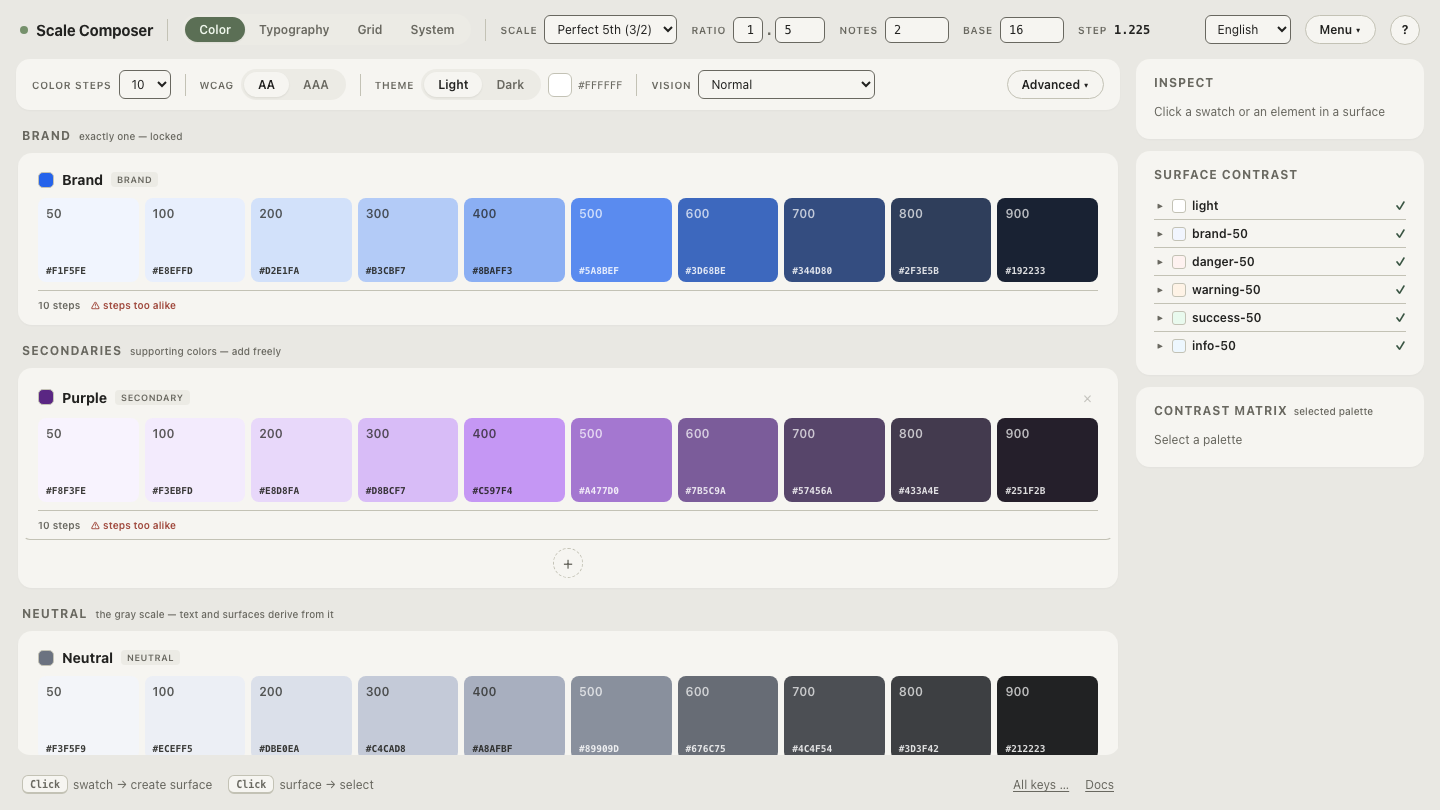
Here is the scale that seed produces — lightness marching on a curve, chroma following a bell profile that peaks near the seed and keeps a floor at the extremes so even the palest and darkest steps hold a hint of blue:
| L | C | Hex |
|---|---|---|
| 0.97 | 0.012 | #f1f5fe |
| 0.90 | 0.040 | #d0dff9 |
| 0.80 | 0.090 | #9fbef8 |
| 0.70 | 0.140 | #6f9cf5 |
| 0.546 | 0.215 | #2563eb ← the seed |
| 0.45 | 0.190 | #1448bc |
| 0.35 | 0.130 | #12347d |
| 0.25 | 0.080 | #0c1f47 |
Every row converts to hex without clamping, because each chroma value sits under the gamut ceiling at its lightness. The seed came in as hex, the thinking happened in OKLCH, and the results leave as hex again — three conversions per step, none of them done by a human.
What happens when you edit and re-export?
Editing is the reason to convert in the first place — and it is where the
asymmetry from the top of this article becomes a daily fact rather than a
curiosity. Push a color’s chroma upward and at some point it leaves sRGB: from
there, its hex spelling is a clamped approximation while the color itself lives
on. Exports handle the split honestly — hex stays sRGB-clamped, and in
Display-P3 mode each step also carries a color(display-p3 …) string holding
the chroma hex can’t. Open the seeded scale, raise the chroma, and
re-export — watch which steps’ hex values stop moving as they
reach the ceiling while the P3 strings keep going.