Gamut Clipping: Why Your Colors Get Crushed
Generate a ten-step blue ramp, push the chroma high so the brand color glows, and ship it. What comes back from the screen is subtly wrong: the palest tint has drifted toward cyan, the darkest steps have collapsed into near-duplicates, and the deepest blue leans purple. Nobody mistyped anything. Several of the requested colors simply cannot be produced on an sRGB screen, and the conversion that forced them back into range crushed them.
Gamut clipping is what happens when a color exists in your color model but not on the display: the value gets forced back inside the screen’s gamut, and the crude default — capping each RGB channel independently — shifts hue and lightness along with chroma, turning the color into a different color rather than a quieter one. There are two remedies: proper gamut mapping when an out-of-range color must be converted, and generating palettes with headroom so no step leaves the gamut in the first place. Both are easier to see in OKLCH — this article is part of our OKLCH guide, where the model itself is introduced.
What does “out of gamut” mean?
A color model is an addressing scheme, and addresses can point at nothing. OKLCH accepts lightness 0.65, chroma 0.25, hue 262.9 without complaint — a well-formed coordinate that no sRGB screen can display. The gamut is the set of colors a device or color space can actually reproduce, and it is a finite, irregular volume sitting inside the model’s much larger coordinate space.
The boundary is easiest to picture as a chroma ceiling that depends on
lightness. Near white and near black there is almost no room for colorfulness;
the ceiling peaks in the midtones. At hue 262.9 — the hue of the blue
#2563eb, which is oklch(0.546 0.215 262.9) — the sRGB ceiling runs like
this:
| Lightness | Max sRGB chroma at hue 262.9 |
|---|---|
| 0.95 | ≈0.024 |
| 0.85 | ≈0.074 |
| 0.70 | ≈0.157 |
| 0.55 | ≈0.250 |
| 0.40 | ≈0.200 |
| 0.25 | ≈0.125 |
A tent, not a wall: tall in the middle, pinched at both ends. Any request above the canvas is out of gamut, and something has to give.
What does naive clamping do to a color?
The cheap conversion caps each RGB channel at its maximum. Ask for
oklch(0.65 0.25 262.9) and the math produces a linear blue channel at ≈1.36
— 36% past what the screen has. Clamp every channel into range and you land on
#3480ff, which reads back as ≈ oklch(0.622 0.204 260.4).
Compare request and result: lightness dropped by ≈0.028, chroma by ≈0.046, and hue rotated ≈2.5° toward cyan. Only chroma was in surplus, yet all three axes moved — because the clamp operates per channel in RGB, with no notion of what the three channels jointly mean.
Proper gamut mapping does have that notion: hold lightness and hue, and reduce
chroma until the color crosses back inside the boundary. The same request maps
to oklch(0.65 ≈0.186 262.9) — about #4f89ff — a visibly quieter version of
the same blue.
The perceptual reason the difference matters: the eye tends to forgive “less
colorful” — it reads as the same color, muted — but a hue shift reads as a
different color. Chroma is volume; hue is identity. Naive clamping trades
identity to save volume, and it gets more violent the further out the request
sits. Ask for a near-white blue tint at chroma 0.22 (the ceiling there is
≈0.024) and clamping lands on #9ee9ff — hue ≈218, a full 45° away. The blue
tint ships as cyan.
Why do ramps flatten instead of just dimming?
A single crushed color is a spot defect. Palettes fail more systematically, because a ramp asks for chroma across many lightnesses while the ceiling varies underneath it. Wherever the request overshoots, every overshooting step gets pressed against the same boundary — and steps designed to differ arrive nearly identical.
Numbers from the dark end of a blue ramp requested at constant chroma 0.28, steps 0.05 apart in lightness:
| Requested | After per-channel clamping | Gap to previous step |
|---|---|---|
oklch(0.40 0.28 262.9) | ≈ oklch(0.402 0.278 264.1) | — |
oklch(0.35 0.28 262.9) | ≈ oklch(0.377 0.261 264.1) | ≈0.025 |
oklch(0.30 0.28 262.9) | ≈ oklch(0.355 0.241 266.1) | ≈0.022 |
oklch(0.25 0.28 262.9) | ≈ oklch(0.334 0.221 269.0) | ≈0.021 |
The requested spacing was 0.05 in lightness; the delivered spacing is ≈0.021–0.025 — less than half, and right at the edge of a just-noticeable difference. Around 0.02 L is roughly where two adjacent swatches stop reading as clearly distinct, which is why Scale Composer fires a warning whenever two neighboring steps land closer than that. Note the hue column drifting from ≈264 to ≈269 as well: the flattened band is not even a consistent blue.
That is the dead band from the opening — not a rendering bug, just several steps sharing one fence.
How do you generate a palette that never clips?
By treating the ceiling as an input instead of an accident. The generation-side fix is headroom: at every lightness, cap the requested chroma slightly below the gamut ceiling, so no step ever needs to be clamped at all.
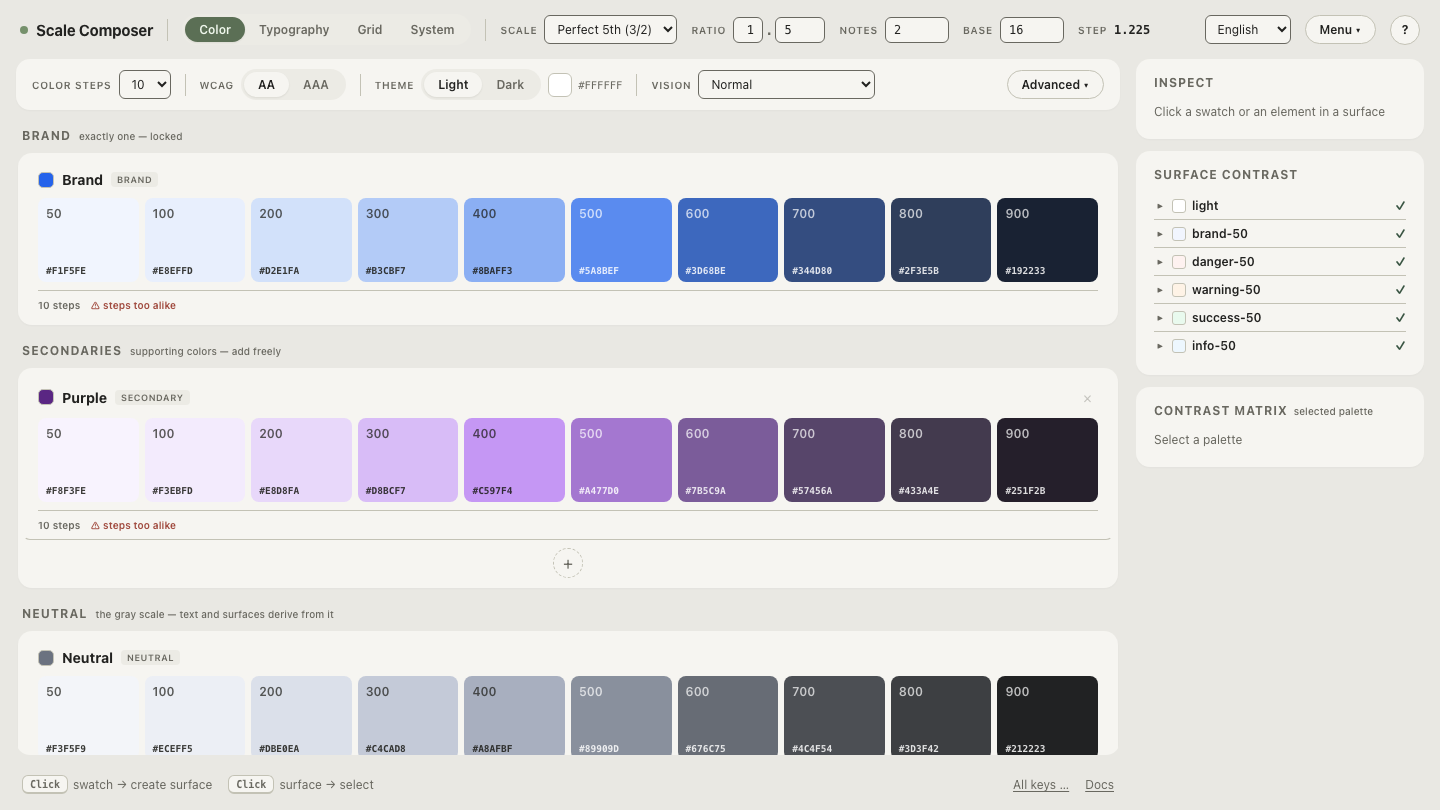
That is how Scale Composer builds scales natively: steps are placed on a lightness curve, chroma follows a bell-shaped profile with a floor — generous in the midtones where the ceiling is high, tapering toward the ends where it is low — and the profile is capped just under the ceiling at each step’s lightness. The vivid middle stays vivid, the pale and dark ends keep their identity, and every value that comes out was producible all along.
Open the ceiling view in Scale Composer — the same blue seed, with each step’s chroma riding just below the sRGB ceiling as it rises and falls across the ramp. Drag the chroma up and you can see which steps would clip first.
Does Display-P3 fix gamut clipping?
It moves the fence; it doesn’t remove it. Display-P3 — the wider gamut on most current phones and Macs — raises the chroma ceiling most where color already lives: at hue 262.9 the lift is only ≈0.003 near white but ≈0.05 around lightness 0.45–0.50 (from ≈0.225 up to ≈0.276). Midtone steps that sat pressed against the sRGB ceiling get real room to breathe.
The discipline stays the same, though: P3 has its own ceiling, and a request
past it clips just as badly. Generating with headroom against the P3
boundary is the same algorithm under a higher canvas. In Scale Composer’s P3
mode each step carries a color(display-p3 …) string for screens that can use
it, while the hex column stays sRGB-clamped — fallback and enhancement
produced by one scale rather than maintained by hand.
See the relief where it lands
Flip the same blue ramp into P3 mode and watch the midtone steps take up the new headroom: chroma rises exactly where the sRGB fence used to press, lightness and hue hold still, and the pale ends barely move. Once you have seen the ceiling as a curve — something a palette rides under rather than crashes into — gamut clipping stops being a mysterious rendering bug and becomes what it always was: a request the screen could never honor, caught at generation time instead of discovered on ship day.