From Figma Color Styles to Real Tokens
Figma color styles and variables solve different problems. A style is a
named paint — a fill definition that can hold a solid color, a gradient or an
image. A variable is a named value with modes: one variable can hold a light
value and a dark value, and switching a frame’s mode flips every fill bound
to it. Turning a Figma palette into real tokens means moving its solid colors
into variables, layered as a primitive collection (the raw ramp steps) and a
semantic collection (roles like text/primary that reference them) — the
same two-layer structure design tokens have in code.
The distance between those two features is where many “our design system lives in Figma” setups quietly stall: a wall of well-named color styles that cannot express dark mode and that code can only mimic by hand. This article covers the split, the layered setup, and the workflow from generated ramp to bound fill; the ramps themselves are the subject of our color scales guide.
What is the difference between color styles and variables?
Styles are the older feature: named paints you apply to fills and strokes.
They are still the only home for gradients and image fills, and for teams
that only need consistent naming they work. What a style cannot do is hold
more than one value — a style called background is one paint, forever,
regardless of theme.
Variables are named values organized into collections, and each collection can define modes — parallel sets of values for the same names. Variables can also reference each other (aliases), and they bind to fills, strokes and effects.
For color, modes are the decisive feature. Define a background variable
with a light value and a dark value, bind it to a frame’s fill, and the dark
theme stops being a parallel file to maintain: select the frame, switch its
mode, and every bound fill on it flips at once. A style-based dark theme, by
contrast, is a second set of styles applied by hand — a redesign that has to
be performed again for every screen.
How should color variables be layered?
In two collections that mirror the token layers in code.
The primitive collection holds the raw material: the ramp steps.
brand/50 through brand/900, the same for the neutral scale and the
functional colors — names that describe what a color is. Primitives
usually need no modes; a ramp step is the same value in any theme.
The semantic collection holds the roles: background, surface,
text/primary, border/default, fill/brand — names that describe what a
color is for. Every semantic variable is an alias into the primitive
collection, and this is the layer that carries modes: in light mode
background references a near-white step, in dark mode a near-black one.
The role’s name stays put while its value travels.
The payoff of the indirection is the same one tokens buy in code: designers work in role vocabulary, the ramp can be regenerated without renaming anything, and dark mode is a re-pointing of aliases rather than new decisions per screen.
What does the workflow look like end to end?
Generation first, binding second.
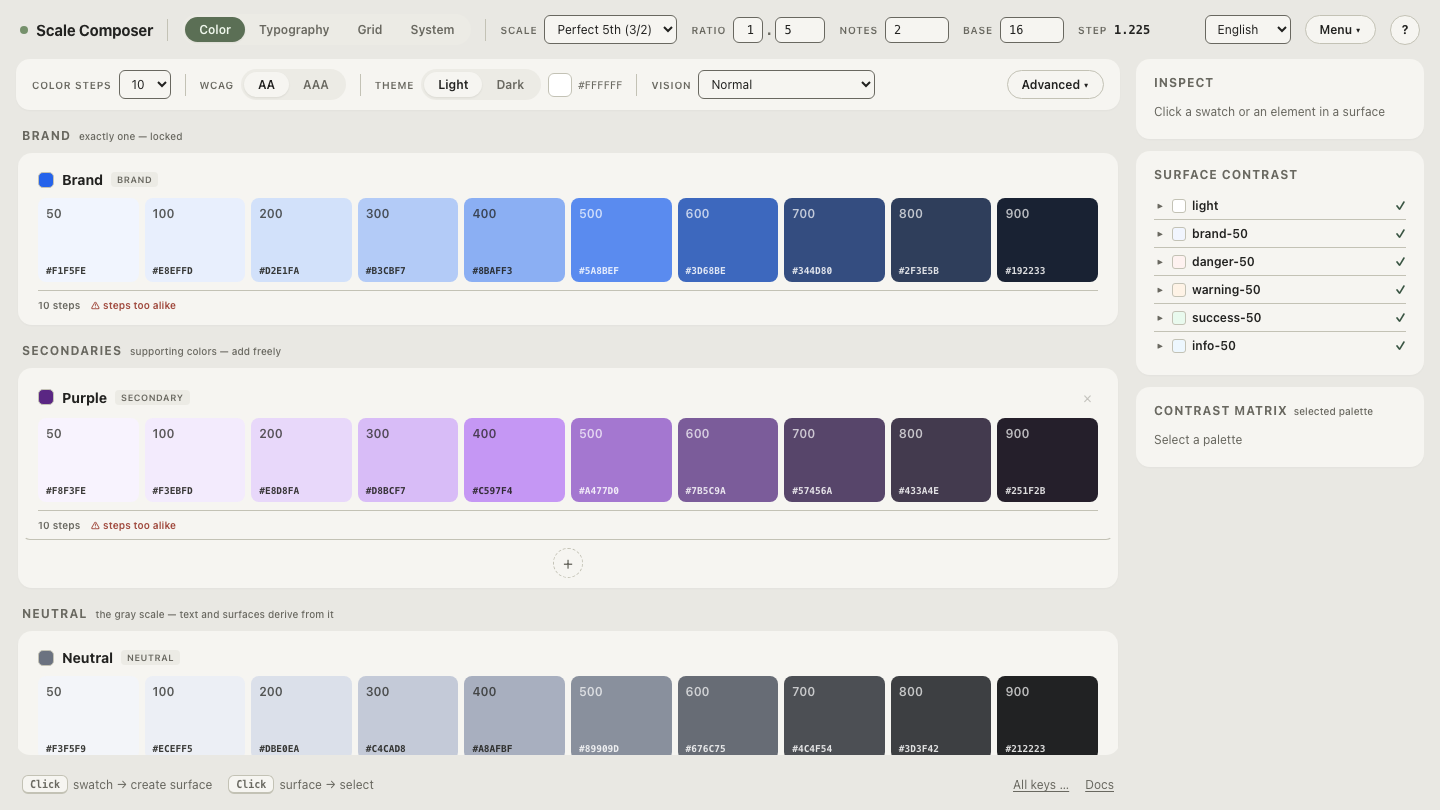
The ramps come from one seed. Give Scale Composer a brand color — #2563eb,
which is oklch(0.546 0.215 262.9) — and it generates the ten-step ramp,
the tinted neutral scale and the functional colors natively in OKLCH, then
derives the semantic roles per surface with WCAG contrast floors checked and
APCA reported alongside. The Figma Variables export carries that structure
out — primitives, semantic aliases, hex values alongside — so the collections
described above arrive built rather than hand-assembled.
Open the palette’s Figma Variables export in Scale Composer — the ramp steps as a primitive collection, the roles aliased on top, ready to import.
From there the designer’s contract is short: bind semantic variables to
fills, never raw steps — the card’s background is surface/tint, not
brand/50, even though they resolve to the same value today. Raw steps are
for building roles, not for touching screens.
Dark mode then arrives as data. Scale Composer derives the dark palette rather than mirroring the light one — its own lightness curve, with chroma boosted by roughly 20 %, because dark surroundings mute perceived colorfulness — and those values become the second mode of the semantic collection. No screen is redesigned; the frames re-resolve.
What does binding discipline actually buy?
Here is the same promotional card built twice. On screen today, the two are identical to the pixel:
| Card layer | Bound build | Hard-coded build |
|---|---|---|
| Card surface | surface/tint → brand/50 | #F1F5FE typed into the fill |
| Card border | border/default → brand/300 | #A5C1F6 |
| Title text | text/primary → brand/900 | #192233 |
| Button fill | fill/brand → brand/500 | #4E82EE |
| Button label | onFill/brand → near-white | #FFFFFF |
Note that the hard-coded build contains no mistakes — every hex is the correct current value. The difference only surfaces when the palette moves, which is exactly when there is least time to fix it.
At rebrand, the seed changes and the primitives re-derive: the bound card
updates everywhere it is instanced, while the hard-coded card needs five
values hunted down and retyped — multiplied by every screen that copied it.
At dark-mode time, the bound card flips with the frame’s mode; the
hard-coded card does not respond at all, so someone builds a card-dark
duplicate, and from that day the two drift independently. The bound column
costs a little discipline per fill; the hard-coded column costs a migration
per change.
What can variables not do for you?
Two honest boundaries. First, color variables hold solid values: gradients and image fills still live in styles, so a real file runs both features side by side — variables for the token-shaped colors, styles for the painterly rest.
Second, binding discipline is human. Figma does not stop anyone from typing a hex into a fill, and a typed hex bypasses the entire chain silently — it will match perfectly until the first rebrand or mode switch, then surface as one stale card in an updated interface. No tool setup replaces the team habit of asking, at every fill, which role is this? The layering makes the right choice cheap; it cannot make the wrong one impossible.
The mode mechanics are easier to trust once you have watched values travel. Export the same palette with light and dark modes side by side — the semantic roles holding their names while both sets of values sit underneath, the dark ones re-derived rather than inverted.